How to produce valid Factur‑X (EN16931) invoices: embedding XML, common validation errors, and fixes
A practical, developer-first guide to generating valid Factur‑X / EN16931 hybrid invoices. Learn how to choose your XML strategy, map required data, embed XML into PDF/A‑3 with Saliox, run structural and semantic validation, and fix the most common issues that block downstream ingestion.
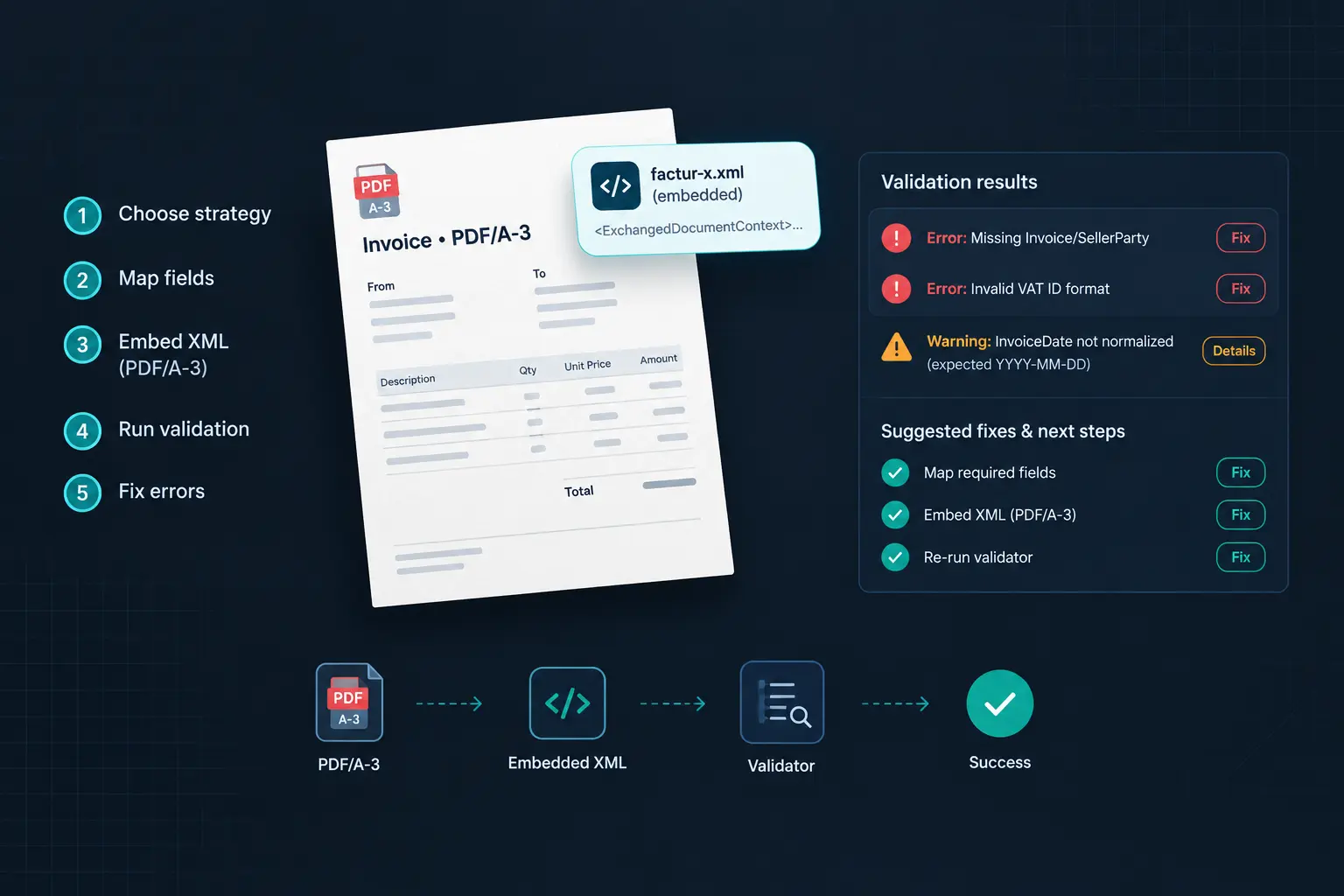
How to produce valid Factur‑X (EN16931) invoices: embedding XML, common validation errors, and fixes
Factur‑X isn’t “just a PDF.” It’s a hybrid artifact: a human‑readable PDF/A‑3 plus embedded EN 16931 XML that must pass structural and semantic validation before many AP/ERP systems will ingest it.
This guide gives you a production checklist and a troubleshooting playbook: decide how you’ll author XML, map mandatory data, embed XML into a PDF/A‑3 container with Saliox, validate structure and semantics, and fix the most common failure modes.
Note: Technical guidance only. Not legal or tax advice. Always verify country‑specific mandates and public‑sector rules before rollout.
1. Quick overview and when to use Factur‑X (EN16931) hybrid invoices
Factur‑X (alongside ZUGFeRD) packages a long‑term‑archivable PDF/A‑3 with embedded EN 16931 XML.
- Human‑readable: finance teams, customers, and auditors get a normal‑looking invoice PDF (PDF/A‑3).
- Machine‑readable: embedded XML enables ERP/AP ingestion, matching, and automation.
Where it fits
- Supplier portals and B2B pipelines that expect EN16931‑conformant invoices
- Public procurement and PEPPOL‑adjacent flows
- Downstream ERP/AP ingestion where a PDF alone is insufficient
Scope here
- Generate the visual PDF/A‑3 and embed XML with the Saliox Factur‑X API
- Validate structure and then semantics
- Troubleshoot and fix common errors
2. Quick checklist: steps to produce a valid Factur‑X invoice
- Choose XML authoring mode
- Pre‑built XML: you supply EN16931 XML.
- Saliox‑generated XML: you supply structured data; Saliox generates and embeds EN16931 XML.
- Collect mandatory EN16931 data
- Parties: seller/buyer legal names, postal addresses, identifiers (e.g., VAT ID) where applicable
- Document: invoice number, issue date, currency; often due date, payment terms
- Lines: description, quantity, unit, unit price, tax category/rate
- Totals: net, tax total(s) with breakdown per rate/category, gross
- Prepare the visual invoice
- HTML/URL/template with correct fonts, A4 (common) page size, print styles, page breaks
- Plan for PDF/A‑3 conversion (embed fonts; avoid unsupported constructs)
- Provide base64 XML or let Saliox generate from data
- Delivery: return binary, store on the Saliox CDN, or deliver to your S3‑compatible bucket
- Sync for tests; async jobs and signed webhooks for batch workloads
- Validate
- Saliox structural checks: PDF/A‑3 markers, embedded file, associated‑file/XMP metadata; missing mandatory fields surfaced when Saliox generates XML
- External EN 16931 semantic validation using the European Commission validation artefacts: rules, math, and profile compliance
- Iterate on fixes
- Resolve missing fields, metadata, encoding, or profile mismatches
- Re‑run semantic validation until green
3. Choose: pre‑built XML vs Saliox‑generated XML
Pre‑built XML
- Pros: Full control over XML content and profile versions; ideal if your ERP exports EN16931 XML or you already have a certified XML generator.
- Cons: You own XML correctness and semantic rule compliance.
- Use when: You have mature XML generation, multi‑country profiles, and strict QA around tax logic.
Saliox‑generated XML
- Pros: Fast path if you hold invoice data but not XML. Saliox maps structured data to EN16931 XML and embeds it.
- Cons: You must provide a complete dataset; complex edge cases still need careful modeling.
- Use when: You need one API to produce both the visual PDF and the embedded XML quickly.
Acceptance tests for either mode
- Edge cases to include: zero‑tax lines (incl. reverse charge), multiple VAT rates, credit notes/negative adjustments, rounding boundaries.
- For each vector: (a) Saliox structural checks pass, (b) EN16931 semantic validator passes, (c) your downstream ERP/AP accepts and line‑matches.
4. Required invoice data and mapping guidance (developer view)
Minimum dataset
- Parties
- Seller: legal name, postal address, tax/VAT identifier where applicable
- Buyer: legal name, postal address, customer reference or tax ID where applicable
- Document
- Invoice number (unique/stable)
- Issue date (ISO 8601)
- Currency (ISO 4217)
- Optional: due date, payment terms, payment means
- Lines
- Description, quantity, unit of measure, unit price before tax
- Line tax category and rate
- Line extension (net), tax amount
- Totals
- Tax total(s) with breakdown per rate/category
- Invoice total without tax, total tax, and grand total with tax
Mapping tips
- Use fixed‑precision decimals for money/quantity; define rounding points and keep them consistent.
- Normalize ISO currency and country codes.
- Provide stable identifiers for parties (legal name + tax/registration IDs where available).
- Compute totals from lines and cross‑check with an independent recomputation in tests.
Edge cases
- Credit notes: set the correct document type; ensure signs/amounts match profile expectations.
- Prepayments/advances: represent prior payments and remaining due where the profile provides elements.
- Multiple VAT rates: provide a correct per‑rate/category breakdown; avoid mixing incompatible categories on one line unless supported.
- Exemptions/alternate schemes: use the correct category code and any required explanatory text.
Validation‑first
- Start with a minimal valid invoice, then add complexity incrementally (more lines, multiple rates, credit notes), validating after each change.
5. How Saliox embeds XML into a PDF/A‑3 invoice (flow and options)
Saliox renders invoice HTML to PDF, converts it to PDF/A‑3, and embeds EN 16931 XML as an associated file.
Supported modes
- Provide pre‑built Factur‑X XML as base64 in the generation request; Saliox embeds it.
- Or send structured invoice data; Saliox generates EN16931 XML and embeds it.
Output and checks
- Target: human‑readable PDF/A‑3 with an embedded machine‑readable XML file.
- Saliox runs structural validation checks for PDF/A‑3 markers, embedded files, associated‑file metadata, and Factur‑X XMP metadata.
- When Saliox generates XML and required data is missing, it reports which mandatory fields are absent.
Delivery options
- Return binary directly, store on the Saliox CDN, or use customer-owned S3 delivery.
Sync vs async
- Sync is fine for low‑volume tests.
- For batch/high‑latency pipelines, use async jobs and webhooks. Webhooks are signed with HMAC‑SHA256 in the X‑Saliox‑Signature header when a webhook secret is configured. Verify signatures with a timing‑safe comparison.
Plan note
- As of the current documentation: async jobs and storage are available from Medium+. Factur‑X and hosted templates are on higher‑tier plans (Large, xLarge, Enterprise). Recheck the current pricing and plan limits before rollout.
6. Example generation workflow (architecture + request pattern)
- Render the visual invoice
- Use your HTML/URL or a Saliox hosted template.
- Ensure print styles, web fonts, and page breaks are correct for your target size (A4 common).
- Attach or generate EN16931 XML
- If you generate XML, base64‑encode it for the request.
- Otherwise, supply structured data for Saliox to generate XML.
- Convert to PDF/A‑3 and embed XML
- Saliox performs structural checks and includes results with the job outcome (confirm exact response fields in docs).
- Store/deliver
- Choose binary return, Saliox CDN, or your S3‑compatible bucket.
- Validate semantics externally
- Run an EN16931 semantic validator. Fail the pipeline on violations.
High‑level request pattern (pseudocode)
# Verify endpoint, versioning, and field names in the Generate and Factur-X API docs before use.
curl -X POST \
  https://saliox.com/api/v1/generate \
  -H "Authorization: Bearer $SALIOX_API_KEY" \
  -H "Content-Type: application/json" \
  -d '{
    "source": {
      "url": "https://your-app.example.com/invoices/INV-1001"
      # or "html": "<html>..."
      # or "templateId": "tmpl_...", "data": { /* structured invoice data */ }
    },
    "format": "pdf",
    "options": {
      # PDF options (size A4, margins, print backgrounds, etc.)
      # Place PDF/A-3 and Factur-X options according to current docs
    },
    "facturx": {
      # One of:
      # - Provide XML: xmlBase64 + profile
      # - Generate XML: data + profile
    },
    "delivery": {
      # returnType or storage selection per the current storage documentation
    }
  }'
Operational notes
- Follow the authentication guidance: keep API keys server‑side and never expose them in browser code.
- Start free to test rendering; upgrade to a plan that supports Factur‑X before production.
- Prefer your own S3‑compatible bucket for predictable downstream processing.
Error handling and retries
- Retry with backoff on 429 and 503, following the documented rate limits and error responses.
- For async jobs, poll job status or process webhooks; make generation idempotent using your own job IDs.
7. Interpreting Saliox structural validation output
What Saliox validation checks
- PDF/A‑3 markers are present.
- An XML file is embedded as an associated file.
- Associated‑file and Factur‑X XMP metadata are present.
- If Saliox generated the XML: mandatory invoice fields are present.
What success means
- The result indicates a valid PDF/A‑3 container with one embedded XML file and required metadata. This does not guarantee semantic validity—always run an external EN16931 validator.
Typical diagnostics
- Missing mandatory fields (when Saliox generates XML): a list of absent fields to add to your payload.
- Embedding/metadata issues: messages indicating missing associated file and/or required metadata.
8. Common validation errors, root causes, and concrete fixes
- Missing mandatory invoice fields
- Symptom: Structural check fails (Saliox‑generated XML) or semantic validator flags missing core fields.
- Root cause: Incomplete data mapping (e.g., buyer ID, invoice number, dates, totals).
- Fix: Add the named fields; re‑generate and re‑validate. Add CI tests that fail on missing mandatory fields.
- Embedded file not discovered by downstream systems
- Symptom: AP/ERP can’t find the XML in the PDF.
- Root cause: XML not embedded or associated‑file/XMP metadata incomplete.
- Fix: Ensure the request included XML or XML generation; confirm Saliox structural checks pass; use a PDF inspector to verify the associated‑file entry and relationship.
- Encoding errors in XML
- Symptom: XML parsing errors or garbled characters.
- Root cause: Wrong character encoding or ill‑formed XML.
- Fix: Enforce UTF‑8; escape special characters; validate against EN16931 with a standards validator.
- PDF/A‑3 conversion issues (fonts, color profiles)
- Symptom: PDF/A‑3 validation fails or fonts are substituted.
- Root cause: Non‑embeddable fonts or unsupported objects.
- Fix: Use properly licensed web fonts and ensure embedding via CSS; enable print‑backgrounds for brand colors; re‑render with PDF/A‑3 conversion enabled.
- Semantic validation failures (EN16931 rules)
- Symptom: Validator flags totals/tax breakdowns or document type issues.
- Root cause: Line math and totals don’t reconcile; credit‑note type missing for negative totals; wrong tax category/rate.
- Fix: Unit‑test math; cross‑check line‑level VAT vs total VAT; use a consistent rounding strategy; set the correct credit‑note document type.
- Delivery/ingestion failures
- Symptom: File not delivered or storage rejects it.
- Root cause: Misconfigured delivery or permissions; inaccessible CDN URL.
- Fix: Prefer a verified customer‑owned S3‑compatible bucket; check credentials, bucket, path, and overwrite behavior; if using Saliox CDN, verify returned URL and network rules.
9. End‑to‑end testing matrix and CI integration
Test vectors
- Simple taxable invoice: single line, one VAT rate
- Zero‑VAT lines: mixture of taxable and zero‑rated
- Multiple VAT rates: at least two rates
- Credit note: negative adjustments with correct document type
- Long descriptions with special characters
- Attachment‑heavy invoice to stress PDF/A‑3
Automated checks per vector
- Saliox structural checks pass
- External EN16931 semantic validator passes
- Downstream ingestion test (mock ERP) accepts and extracts XML
CI flow
- Generate PDF/A‑3 in test; extract XML; run XML schema/semantic validation; run PDF/A‑3 inspection for associated‑file/XMP; fail the build on any regression.
Node.js outline — async generation + webhook verification
// Pseudocode; confirm endpoints/fields/headers in Saliox docs. No SDK assumptions.
import crypto from 'node:crypto';

function verifyWebhookSignature(rawBody, signatureHeader, secret) {
  const expected = crypto.createHmac('sha256', secret).update(rawBody).digest('hex');
  return timingSafeEqualHex(signatureHeader, expected);
}

function timingSafeEqualHex(a, b) {
  const ab = Buffer.from(a, 'hex');
  const bb = Buffer.from(b, 'hex');
  if (ab.length !== bb.length) return false;
  return crypto.timingSafeEqual(ab, bb);
}

// Express-style pseudocode
app.post('/webhooks/saliox', express.raw({ type: '*/*' }), (req, res) => {
  const sig = req.header('X-Saliox-Signature'); // verified header name
  if (!verifyWebhookSignature(req.body, sig, process.env.SALIOX_WEBHOOK_SECRET)) {
    return res.status(400).send('Invalid signature');
  }
  const event = JSON.parse(req.body.toString('utf8'));
  // 1) Inspect structural validation in the event payload (confirm exact fields)
  // 2) Download the PDF (from storage URL), extract XML, run EN16931 semantic validator
  // 3) Persist jobId <-> invoiceId correlation for auditing
  res.sendStatus(200);
});
10. Monitoring and production best practices
- Correlate IDs: Persist Saliox job IDs and webhook receipts linked to your invoice IDs.
- Alerting: Alert on structural check failures and repeated semantic errors per supplier or template change.
- Golden samples: Maintain a canonical test set covering edge cases; run on every template or logic change.
- Rate/queue handling: Monitor 429/503s and apply exponential backoff with jitter.
- Storage control: Prefer delivery to a customer‑owned S3‑compatible bucket for deterministic retention and access.
11. Appendix: validator and tooling recommendations (non‑prescriptive)
- EN 16931 semantic validator: use the European Commission conformance-testing guidance and current validation artefacts to verify profile rules and totals.
- PDF inspector: pair an external PDF/A‑3 inspector with Saliox structural validation to confirm the embedded XML appears as an associated file with the required metadata.
- XML schema/encoding checks: catch ill‑formed XML and encoding issues early.
- Numeric unit tests: recompute lines/totals and assert equality to catch rounding regressions.
Example: local CI test to extract and validate XML (outline)
Pseudocode only. Choose concrete libraries and verify their APIs.
# Render -> extract XML -> run EN16931 validation (conceptual)

def generate_facturx_pdf(invoice_payload) -> bytes:
    # POST to Saliox with format=pdf, PDF/A-3 enabled, and Factur-X options
    # Return binary PDF bytes. Confirm endpoint/fields in docs.
    pass


def extract_embedded_xml(pdf_bytes) -> bytes:
    # Use a PDF tool to list associated files and return the XML attachment
    pass


def validate_en16931(xml_bytes) -> list[str]:
    # Run your chosen semantic validator; return rule violations
    pass


def test_facturx_invoice_smoke():
    pdf_bytes = generate_facturx_pdf({...})
    xml_bytes = extract_embedded_xml(pdf_bytes)
    violations = validate_en16931(xml_bytes)
    assert not violations, f"EN16931 violations: {violations}"
Where Saliox fits
Saliox provides one managed API for hybrid invoices: the visual PDF rendering and the embedded EN16931 XML.
- Generate from URLs, raw HTML, or hosted templates
- Convert to PDF/A‑3 and embed EN16931 XML (supplied by you or generated by Saliox)
- Deliver as binary, via Saliox CDN, or to your S3‑compatible bucket
- Use async jobs and signed webhooks for scalable pipelines
- Pair Saliox structural checks with an external EN16931 validator for full semantic compliance
Further reading and references
Saliox documentation
- Factur‑X / EN 16931 API overview
- Generate API reference
- Factur‑X and ZUGFeRD API options
- PDF/A‑3 and embedded XML validation
- Hosted templates and data injection
- Async jobs, webhooks, and polling
- Customer-owned S3 delivery
Standards and validation
- Factur‑X specification and implementation guidance — FNFE‑MPE
- ZUGFeRD / Factur‑X standard — FeRD
- European standard and specifications for eInvoicing — European Commission
- EN 16931 validation artefacts — European Commission
Try Saliox with a real invoice from your application: generate a PDF/A‑3 invoice with embedded EN 16931 XML and test it end to end. Start free and verify rendering before upgrading your plan.